
|
|
By Todd Ogasawara, Mar. 14,
2001
Copyright 2002 Todd Ogasawara
If you want something done right, you have to do it yourself. HanDBase can
help you create data-driven applications that custom fit your specific
requirements.
DDH Software HanDBase for the Pocket PC
HanDBase can’t do everything, but it comes pretty close.
English
The Pocket PC comes with great applications built right into its ROM (Read Only Memory). And, there are even more great applications, utilities, and games from third-party developers. But, if you are like me there are many tasks that seem to need customized software tools in order to let you really get productive with a Pocket PC. And, many of these tasks are the kind that requires you to enter and/or retrieve a great deal of information.
But how can you build a custom Pocket PC solution if you are not a programmer and you do not want to spend a small fortune to have one custom programmed for you? If this describes your situation, DDH Software’s HanDBase is the tool that may be able to help you. You can read my HanDBase review for an overview of this database development application. In this article, you will learn how to build a simple HanDBase applet.
HanDBase lets you build databases. But, its creator often refers to these databases as applets. The reason, I think, is that the rich set of data entry and retrieval tools gives you the feeling that each database you create is a unique application. This article will use the terms database and applet interchangeably for that reason.
Figure 1 shows you the screen that lets you either choose an existing database or create a new one.
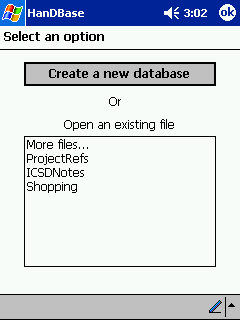 Figure 1. Initial screen lets you create a new database. |
However, before you tap that Create a new database button, I suggest you take a step back. If you have never written a computer program or designed a database on a desktop or mainframe computer, I strongly recommend that you use your stylus and Pocket PC Notes (or even a pencil and paper!) to create an overview of what your applet is supposed to do and what data it needs to perform whatever its task may be.
Figure 2 shows you what you see after you press the Create a new database button. Figure 3 shows the screen you see if you press the Security Settings button on that page. The discussion of this group of settings is beyond the scope of this article. So, we will ignore it and concentrate on the basics of building an applet. Figure 4 is what you see if you press the Author button. Its two text boxes are self-explanatory.
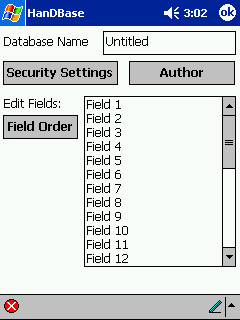 Figure 2. Define the database. |
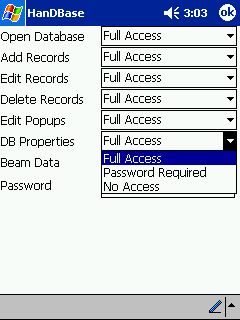 Figure 3. Security Settings. |
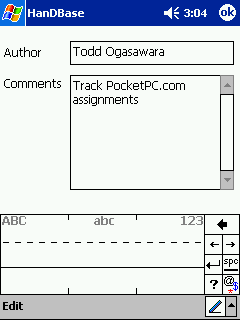 Figure 4. Author information. |
So, let’s return to Figure 2 and the task of sketching out the design of a simple database. A database consists of a collection of records. A record is defined by a set of consistent fields. Each field specifies a unique component of a record. You could, for example, have one field to enter a person’s given name, another for the person’s surname, and a third field for the person’s birth date. If you entered the information for 10 people, then the database would contain 10 records.
If you want to build a HanDBase applet that works well, you need to carefully choose and define fields that will form your database record. In order to do so, you need to know what HanDBase lets you do and the features it offers. Here are three important pieces of HanDBase-specific information to keep in mind:
The 16 unique field types are:
You can get detailed information about each field type by referring to the HanDBase Web-accessible documentation.
The database I built for this article is a very practical one for me. It tracks my PocketPC.com writing assignments. There are nine fields in my article tracking database. You can see my definition for each field below in the following format: Field Name—Field Type—Field description.
You can see I only used 4 of the 16 available field types to define the fields of my database record. When we complete the project in Part II, you will see how the information entered into the database lets me define, track, and bill for my writing Part I.
That is it for the first part of the article. Head over to
Part
II for the conclusion of this article where the database is put together and
you see the finished product.